Individual steps (Quick Tools) 
DEMULTIPLEXING
If data is multiplexed, the first step would be demultiplexing (using cutadapt (Martin 2011)). This is done based on the user specified indexes file, which includes molecular identifier sequences (so called indexes/tags/barcodes) per sample. Note that reverse complementary matches will also be searched.
demultiplexed_out directory. Indexes are truncated from the sequences..R1 and .R2 read identifiers.Note
When using paired indexes, then sequences with any index combination will be outputted to ‘unnamed_index_combinations’ dir. That means, if, for example, your sample_1 is indexed with indexFwd_1-indexRev_1 and sample_2 with indexFwd_2-indexRev_2, then files with indexFwd_1-indexRev_2 and indexFwd_2-indexRev_1 are also written (although latter index combinations were not used in the lab to index any sample [i.e. represent tag-switches]). Simply remove those files if not needed or use to estimate tag-switching error if relevant.
Setting |
Tooltip |
|---|---|
index file |
select your fasta formatted indexes file for demultiplexing
(see guide here), where fasta headers are sample
names, and sequences are sample specific index or index combination
|
|
allowed mismatches during the index search |
overlap |
number of overlap bases with the index. Recommended overlap is the
maximum length of the index for confident sequence assignments to
samples
|
search window |
the index search window size. The default 35 means that the forward
index is searched among the first 35 bp and the reverse index among
the last 35 bp. This search restriction prevents random index
matches in the middle of the sequence
|
|
minimum length of the output sequence |
no indels |
do not allow insertions or deletions is primer search. Mismatches
are the only type of errors accounted in the error rate parameter
|
Note
Heterogenity spacers or any redundant base pairs attached to index sequences do not affect demultiplexing. Indexes are trimmed from the best matching position.
Indexes file example (fasta formatted)
Note
Only IUPAC codes are allowed in the sequences. Avoid using ‘.’ in the sample names (e.g. instead of sample.1, use sample_1)
Demultiplexing using single indexes:
>sample1AGCTGCACCTAA>sample2AGCTGTCAAGCT>sample3AGCTTCGACAGT>sample4AGGCTCCATGTA>sample5AGGCTTACGTGT>sample6AGGTACGCAATT
Demultiplexing using paired (dual) indexes:
Important
IMPORTANT! The reverse indexes must be in the 3’-5’ orientation in the indexes file when doing demultiplexing in PipeCraft, because reverse indexes are automatically oriented to 5’-3’ under the hood. This facilitates the simple copy-paste of the indexes from the lab protocol. But if you already have pre-compliled indexes file, so, that you have reverse indexes already reverse-comlemented, then the demultiplexing will fail (all will be unknown.fastq).
Note
Anchored indexes (https://cutadapt.readthedocs.io/en/stable/guide.html#anchored-5adapters) with ^ symbol are not supported in PipeCraft demultiplex GUI panel.
DO NOT USE, e.g.
How to compose indexes.fasta
In Excel (or any alternative program); first column represents sample names, second (and third) column represent indexes (or index combinations) per sample:
Example of single-end indexes
sample1    AGCTGCACCTAA
sample2    AGCTGTCAAGCT
sample3    AGCTTCGACAGT
sample4    AGGCTCCATGTA
sample5    AGGCTTACGTGT
sample6    AGGTACGCAATT
Example of paired indexes
sample1    AGCTGCACCTAA    AGCTGCACCTAA
sample2    AGCTGTCAAGCT    AGCTGTCAAGCT
sample3    AGCTTCGACAGT    AGCTTCGACAGT
sample4    AGGCTCCATGTA    AGGCTCCATGTA
sample5    AGGCTTACGTGT    AGGCTTACGTGT
sample6    AGGTACGCAATT    AGGTACGCAATT
Copy those two (or three) columns to text editor that support regular expressions, such as NotePad++ or Sublime Text.
single-end indexes:
Open ‘find & replace’ Find ^ (which denotes the beginning of each line). Replace with > (and DELETE THE LAST > in the beginning of empty row).
Find \t (which denotes tab). Replace with \n (which denotes the new line).
FASTA FORMATTED (single-end indexes) indexes.fasta file is ready; SAVE the file.
Paired indexes:
Open ‘find & replace’: Find ^ (denotes the beginning of each line); replace with > (and DELETE THE LAST > in the beginning of empty row).
Find .*\K\t (which captures the second tab); replace with … (to mark the linked paired-indexes).
Find \t (denotes the tab); replace with \n (denotes the new line).
FASTA FORMATTED (paired indexes) indexes.fasta file is ready; SAVE the file.
CUT PRIMERS
If the input data contains PCR primers (or e.g. adapters), these can be removed in the CUT PRIMERS panel.
CUT PRIMERS processes mostly relies on cutadapt (Martin 2011).
For generating OTUs or ASVs, it is recommended to truncate the primers from the reads (unless ITS Extractor is used later to remove flanking primer binding regions from ITS1/ITS2/full ITS; in that case keep the primers better detection of the 18S, 5.8S and/or 28S regions). Sequences where PCR primer strings were not detected are discarded by default (but stored in ‘untrimmed’ directory). Reverse complementary search of the primers in the sequences is also performed. Thus, primers are clipped from both 5’-3’ and 3’-5’ oriented reads. However, note that paired-end reads will not be reoriented to 5’-3’ during this process, but single-end reads will be reoriented to 5’-3’ (thus no extra reorient step needed for single-end data).
Note
For paired-end data, the seqs_to_keep option should be left as default (‘keep_all’). This will output sequences where at least one primer has been clipped. ‘keep_only_linked’ option outputs only sequences where both the forward and reverse primers are found (i.e. 5’-forward…reverse-3’). ‘keep_only_linked’ may be used for single-end data to keep only full-length amplicons.
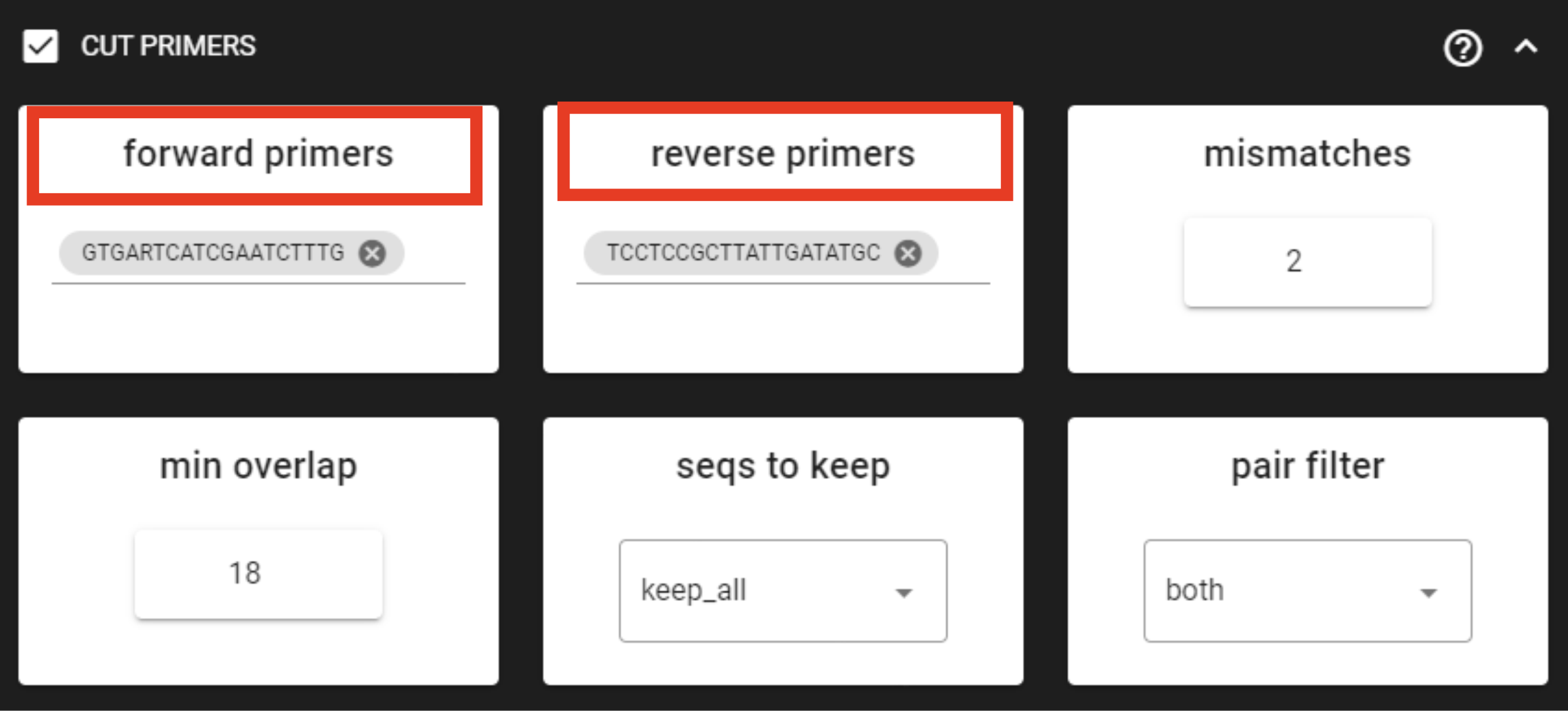
Example above: Forward primer has 19 bp and reverse 20 bp - to keep a bit of flexibility in the primer search, we are requesting the min overlap of 18 bp and are allowing maximum of 2 mismatches .
Note that too low min overlap may lead to random matches.
primersCut_out directory. Primers are truncated from the sequences.when working with your own ITS data …
… and applying the ITSx step, then note that cutting primers process may be skipped, since those regions are removed in the ITS subregion extraction process.
Setting |
Tooltip |
|---|---|
forward primers |
specify forward primer (5’-3’); IUPAC codes allowed; add up to
13 primers
|
reverse primers |
specify reverse primer (3’-5’); IUPAC codes allowed; add up to
13 primers
|
|
allowed mismatches in the primer search |
min overlap |
number of overlap bases with the primer sequence. Partial matches
are allowed, but short matches may occur by chance, leading to
erroneously clipped bases. Specifying higher overlap than the length
of primer sequnce will still clip the primer (e.g. primer length is
22 bp, but overlap is specified as 25 - this does not affect the
identification and clipping of the primer as long as the match is
in the specified mismatch error range)
|
seqs to keep |
keep sequences where at least one primer was found (fwd or rev);
recommended when cutting primers from paired-end data (unassembled),
when individual R1 or R2 read lengths are shorther than the expected
amplicon length. ‘keep_only_linked’ = keep sequences if primers are
found in both ends (fwd…rev); discards the read if both primers were
not found in this read
|
pair filter |
applies only for paired-end data. ‘both’, means that a read is
discarded only if both, corresponding R1 and R2, reads do not
contain primer strings (i.e. a read is kept if R1 contains primer
string, but no primer string found in R2 read). Option ‘any’
discards the read if primers are not found in both, R1 and R2 reads
|
|
minimum length of the output sequence |
no indels |
do not allow insertions or deletions is primer search. Mismatches
are the only type of errprs accounted in the error rate parameter
|
QUALITY FILTERING
Quality filter and trim sequences.
qualFiltered_out directory.vsearch
vsearch setting |
Tooltip |
|---|---|
maxEE |
maximum number of expected errors per sequence
(see here).
Sequences with higher error rates will be discarded
|
|
discard sequences with more than the specified number of Ns |
|
minimum length of the filtered output sequence |
max_length |
discard sequences with more than the specified number of bases. Note
NOT be lower than ‘trunc length’ (otherwise all reads are discared)
[empty field = no action taken] Note that if ‘trunc length’ setting
is specified, then ‘min length’ SHOULD BE lower than ‘trunc length’
(otherwise all reads are discared)
|
qmax |
specify the maximum quality score accepted when reading FASTQ files.
The default is 41, which is usual for recent Sanger/Illumina 1.8+
files. For PacBio data use 93
|
trunc_length |
truncate sequences to the specified length. Shorter sequences are
discarded; thus if specified, check that ‘min length’ setting is
lower than ‘trunc length’ (‘min length’ therefore has basically no
effect) [empty field = no action taken]
|
qmin |
which is usual for recent Sanger/Illumina 1.8+ files. Older formats
may use scores between -5 and 2
|
maxee_rate |
discard sequences with more than the specified number of expected
errors per base
|
|
discard sequences with an abundance lower than the specified value |
trimmomatic
trimmomatic setting |
Tooltip |
|---|---|
window_size |
the number of bases to average base qualities. Starts scanning at
the 5’-end of a sequence and trimms the read once the average
required quality (required_qual) within the window size falls below
the threshold
|
|
the average quality required for selected window size |
|
minimum length of the filtered output sequence |
leading_qual_threshold |
quality score threshold to remove low quality bases from the
beginning of the read. As long as a base has a value below this
threshold the base is removed and the next base will be investigated
|
trailing_qual_threshold |
quality score threshold to remove low quality bases from the end of
the read. As long as a base has a value below this threshold the
base is removed and the next base will be investigated
|
phred |
phred quality scored encoding. Use phred64 if working with data from
older Illumina (Solexa) machines
|
fastp
fastp setting |
Tooltip |
|---|---|
|
the window size for calculating mean quality |
|
the mean quality requirement per sliding window (window_size) |
min_qual |
the quality value that a base is qualified. Default 15 means phred
quality >=Q15 is qualified
|
|
how many percents of bases are allowed to be unqualified (0-100) |
|
discard sequences with more than the specified number of Ns |
min_length |
minimum length of the filtered output sequence. Shorter sequences
are discarded
|
max_length |
reads longer than ‘max length’ will be discarded, default 0 means no
limitation
|
trunc_length |
truncate sequences to specified length. Shorter sequences are
discarded; thus check that ‘min length’ setting is lower than ‘trunc
length’
|
aver_qual |
if one read’s average quality score <’aver_qual’, then this
read/pair is discarded. Default 0 means no requirement
|
low_complexity_filter |
enables low complexity filter and specify the threshold for low
complexity filter. The complexity is defined as the percentage of
base that is different from its next base (base[i] != base[i+1]).
E.g. vaule 30 means then 30% complexity is required. Not specified =
filter not applied
|
DADA2 (‘filterAndTrim’ function)
DADA2 setting |
Tooltip |
|---|---|
maxEE |
discard sequences with more than the specified number of expected
errors
|
maxN |
discard sequences with more than the specified number of N’s
(ambiguous bases)
|
minLen |
remove reads with length less than minLen. minLen is enforced after
all other trimming and truncation
|
truncQ |
truncate reads at the first instance of a quality score less than or
equal to truncQ
|
truncLen |
truncate reads after truncLen bases (applies to R1 reads when
working with paired-end data). Reads shorter than this are
discarded. Explore quality profiles (with QualityCheck module) and
see whether poor quality ends needs to be truncated
|
truncLen_R2 |
applies only for paired-end data. Truncate R2 reads after
truncLen bases. Reads shorter than this are discarded. Explore
quality profiles (with QualityCheck module) and see whether poor
quality ends needs to truncated
|
maxLen |
remove reads with length greater than maxLen. maxLen is enforced on
the raw reads. In dada2, the default = Inf, but here set as 9999
|
minQ |
after truncation, reads contain a quality score below minQ will be
discarded
|
matchIDs |
applies only for paired-end data. after truncation, reads
contain a quality score below minQ will be discarded
|
ASSEMBLE PAIRED-END reads
Assemble paired-end sequences (such as those from Illumina or MGI-Tech platforms).
include_only_R1 represents additional in-built module. If TRUE,
unassembled R1 reads will be included to the set of assembled reads per sample.
This may be relevant when working with e.g. ITS2 sequences, because the ITS2 region in some
taxa is too long for paired-end assembly using current short-read sequencing technology.
Therefore longer ITS2 amplicon sequences are discarded completely after the assembly process.
Thus, including also unassembled R1 reads (include_only_R1 = TRUE), partial ITS2 sequences for
these taxa will be represented in the final output. But when using ITSx
, keep only_full = FALSE and include partial = 50.
Fastq formatted paired-end data is supported.
Outputs are fastq files in assembled_out directory.
vsearch
Setting |
Tooltip |
|---|---|
|
minimum overlap between the merged reads |
|
minimum length of the merged sequence |
allow_merge_stagger |
allow to merge staggered read pairs. Staggered pairs are pairs where
the 3’ end of the reverse read has an overhang to the left of the 5’
end of the forward read. This situation can occur when a very short
fragment is sequenced
|
|
|
max_diffs |
region
|
|
discard sequences with more than the specified number of Ns |
|
maximum length of the merged sequence |
|
output reads that were not merged into separate FASTQ files |
fastq_qmax |
maximum quality score accepted when reading FASTQ files. The default
is 41, which is usual for recent Sanger/Illumina 1.8+ files
|
DADA2
Important
Here, dada2 will perform also denoising (function ‘dada’) before assembling paired-end data. Because of that, input sequences (in fastq format) must consist of only A/T/C/Gs.
Setting |
Tooltip |
|---|---|
minOverlap |
the minimum length of the overlap required for merging the forward
and reverse reads
|
|
the maximum mismatches allowed in the overlap region |
trimOverhang |
if TRUE, overhangs in the alignment between the forwards and reverse
read are trimmed off. Overhangs are when the reverse read extends
past the start of the forward read, and vice-versa, as can happen
when reads are longer than the amplicon and read into the
other-direction primer region
|
justConcatenate |
if TRUE, the forward and reverse-complemented reverse read are
concatenated rather than merged, with a NNNNNNNNNN (10 Ns) spacer
inserted between them
|
pool |
denoising setting. If TRUE, the algorithm will pool together all
samples prior to sample inference. Pooling improves the detection of
rare variants, but is computationally more expensive. If pool =
‘pseudo’, the algorithm will perform pseudo-pooling between
individually processed samples.
|
selfConsist |
denoising setting. If TRUE, the algorithm will alternate between
sample inference and error rate estimation until convergence
|
qualityType |
‘Auto’ means to attempt to auto-detect the fastq quality encoding.
This may fail for PacBio files with uniformly high quality scores,
in which case use ‘FastqQuality’
|
CHIMERA FILTERING
Perform de-novo and reference database based chimera filtering.
Chimera filtering is performed by sample-wise approach (i.e. each sample (input file) is treated separately).
chimera_Filtered_out directory.uchime_denovo
Setting |
Tooltip |
|---|---|
pre_cluster |
identity percentage when performing ‘pre-clustering’ with
–cluster_size for denovo chimera filtering with –uchime_denovo
|
min_unique_size |
minimum amount of a unique sequences in a fasta file. If value = 1,
then no sequences are discarded after dereplication; if value = 2,
then sequences, which are represented only once in a given file are
discarded; and so on
|
|
if TRUE, then perform denovo chimera filtering with –uchime_denovo |
reference_based |
perform reference database based chimera filtering with
–uchime_ref. Select fasta formatted reference database (e.g. UNITE
for ITS reads).
If denovo = TRUE, then reference based chimera filtering will
be performed after denovo.
|
abundance_skew |
the abundance skew is used to distinguish in a threeway alignment
which sequence is the chimera and which are the parents. The
assumption is that chimeras appear later in the PCR amplification
process and are therefore less abundant than their parents. The
default value is 2.0, which means that the parents should be at
least 2 times more abundant than their chimera. Any positive value
equal or greater than 1.0 can be used
|
min_h |
minimum score (h). Increasing this value tends to reduce the number
of false positives and to decrease sensitivity. Values ranging from
0.0 to 1.0 included are accepted
|
uchime3_denovo
Setting |
Tooltip |
|---|---|
pre_cluster |
identity percentage when performing ‘pre-clustering’ with
–cluster_size for denovo chimera filtering with –uchime_denovo
|
min_unique_size |
minimum amount of a unique sequences in a fasta file. If value = 1,
then no sequences are discarded after dereplication; if value = 2,
then sequences, which are represented only once in a given file are
discarded; and so on
|
|
if TRUE, then perform denovo chimera filtering with –uchime_denovo |
reference_based |
perform reference database based chimera filtering with
–uchime_ref. Select fasta formatted reference database (e.g. UNITE
for ITS reads.
If denovo = TRUE, then reference based chimera filtering will
be performed after denovo.
|
abundance_skew |
the abundance skew is used to distinguish in a threeway alignment
which sequence is the chimera and which are the parents. The
assumption is that chimeras appear later in the PCR amplification
process and are therefore less abundant than their parents. The
default value is 2.0, which means that the parents should be at
least 2 times more abundant than their chimera. Any positive value
equal or greater than 1.0 can be used
|
min_h |
minimum score (h). Increasing this value tends to reduce the number
of false positives and to decrease sensitivity. Values ranging from
0.0 to 1.0 included are accepted
|
ITS Extractor
When working with ITS amplicons, then extract ITS regions with ITS Extractor (Bengtsson-Palme et al. 2013)
Note
Note that for better detection of the 18S, 5.8S and/or 28S regions, keep the primers (i.e. do not use ‘CUT PRIMERS’)
ITSx_out directory.Note
To START, specify working directory under SELECT WORKDIR and the sequence files extension, but the read types (single-end or paired-end) does not matter here (just click ‘Next’).
Setting |
Tooltip |
|---|---|
organisms |
set of profiles to use for the search. Can be used to restrict the
search to only a few organism groups types to save time, if one or
more of the origins are not relevant to the dataset under study
|
regions |
ITS regions to output (note that ‘all’ will output also full ITS
region [ITS1-5.8S-ITS2])
|
partial |
if larger than 0, ITSx will save additional FASTA-files for full and
partial ITS sequences longer than the specified cutoff value. If his
setting is left to 0 (zero), it means OFF
|
e-value |
domain e-value cutoff a sequence must obtain in the HMMER-based step
to be included in the output
|
scores |
domain score cutoff that a sequence must obtain in the HMMER-based
step to be included in the output
|
domains |
the minimum number of domains (different HMM gene profiles) that
must match a sequence for it to be included in the output (detected
as an ITS sequence). Setting the value lower than two will increase
the number of false positives, while increasing it above two will
decrease ITSx detection abilities on fragmentary data
|
|
if TRUE, ITSx checks both DNA strands for matches to HMM-profiles |
only full |
If TRUE, the output is limited to full-length ITS1 and ITS2 regions
only
|
truncate |
removes ends of ITS sequences if they are outside of the ITS region.
If FALSE, the whole input sequence is saved
|
CLUSTERING
Cluster sequences, generate OTUs or zOTUs (with UNOISE3)
clustering_out directory.Note
output OTU table is tab delimited text file.
vsearch
Tooltip |
|
|---|---|
OTU_type |
centroid” = output centroid sequences; “consensus” = output
consensus sequences
|
similarity_threshold |
define OTUs based on the sequence similarity threshold; 0.97 = 97%
similarity threshold
|
strands |
when comparing sequences with the cluster seed, check both strands
(forward and reverse complementary) or the plus strand only
|
remove_singletons |
if TRUE, then singleton OTUs will be discarded (OTUs with only one
sequence)
|
similarity_type |
pairwise sequence identity definition
|
sequence_sorting |
size = sort the sequences by decreasing abundance; “length” = sort
the sequences by decreasing length (–cluster_fast); “no” = do not
sort sequences (–cluster_smallmem –usersort)
|
centroid_type |
“similarity” = assign representative sequence to the closest (most
similar) centroid (distance-based greedy clustering); “abundance” =
assign representative sequence to the most abundant centroid
(abundance-based greedy clustering; –sizeorder),
max_hitsshould be > 1
|
max_hits |
maximum number of hits to accept before stopping the search (should
be > 1 for abundance-based selection of centroids [centroid type])
|
mask |
mask regions in sequences using the “dust” method, or do not mask
(“none”)
|
UNOISE3, with vsearch
Tooltip |
|
|---|---|
similarity_threshold |
optionally cluster zOTUs to OTUs based on the sequence similarity
threshold; if id = 1, no OTU clustering will be performed
|
similarity_type |
pairwise sequence identity definition for OTU clustering
|
|
maximum number of hits to accept before stopping the search |
maxrejects |
maximum number of non-matching target sequences to consider before
stopping the search
|
mask |
mask regions in sequences using the “dust” method, or do not mask
(“none”)
|
strands |
when comparing sequences with the cluster seed, check both strands
(forward and reverse complementary) or the plus strand only
|
|
minimum abundance of sequences for denoising |
unoise_alpha |
alpha parameter to the vsearch –cluster_unoise command. default =
2.0.
|
denoise_level |
at which level to perform denoising; global = by pooling samples,
individual = independently for each sample (if samples are denoised
individually, reducing minsize to 4 may be more reasonable for
higher sensitivity)
|
|
perform chimera removal with uchime3_denovo algoritm |
abskew |
the abundance skew of chimeric sequences in comparsion with parental
sequences (by default, parents should be at least 16 times more
abundant than their chimera)
|
ASSIGN TAXONOMY
Implemented tools for taxonomy annotation:
BLAST
Important
BLAST database needs to be an unzipped fasta file in a separate folder (fasta will be automatically converted to BLAST database files). If converted BLAST database files (.ndb, .nhr, .nin, .not, .nsq, .ntf, .nto) already exist, then just SELECT one of those files as BLAST database in ‘ASSIGN TAXONOMY’ panel.
Note
To START, specify working directory under SELECT WORKDIR (will be the output directory),
but the sequence files extension and read type (single-end or paired-end) does not matter here (just click ‘Next’).
Important
Make sure you do not have any other BLAST database files is the same directory as the database you are using. That is, use dedicated directory for the BLAST database.
Note
BLAST values filed separator is ‘+’. When pasting the taxonomy results to e.g. Excel, then first denote ‘+’ as as filed separator to align the columns.
Check this section for additional parsing of the BLAST results.
Setting |
Tooltip |
|---|---|
database_file |
select a database file in fasta format. Fasta format will be
automatically converted to BLAST database
|
|
select a fasta file to be used as a query for BLAST search |
|
BLAST search settings according to blastn or megablast |
strands |
query strand to search against database. Both = search also reverse
complement
|
e_value |
a parameter that describes the number of hits one can expect to see
by chance when searching a database of a particular size. The lower
the e-value the more ‘significant’ the match is
|
word_size |
the size of the initial word that must be matched between the
database and the query sequence
|
|
reward for a match |
|
penalty for a mismatch |
|
cost to open a gap |
|
cost to extend a gap |
RDP classifier
Important
RDP classifier database needs to be an a trained database Check section “Trained classifiers that work with MetaWorks and the RDP Classifier” from MetaWorks for the list of trained databases.
taxonomy_out.rdp directory:Note
To START, specify working directory under SELECT WORKDIR (will be the output directory),
but the sequence files extension and read type (single-end or paired-end) does not matter here (just click ‘Next’).
Setting |
Tooltip |
|---|---|
|
select a trained RDP classifier database |
|
select a fasta file to be used as a query for RDP classifier |
|
confidence threshold for assigning a taxonomic level |
|
the amount of memory to allocate for the RDP classifier |
SINTAX
Important
Note that the database sequence headers need to be in the following format: >CP002711;tax=d:Fungi,p:Ascomycota,c:Saccharomycetes,o:Saccharomycetales, f:Saccharomycetaceae,g:Eremothecium,s:gossypii;
This structured header allows SINTAX to accurately interpret the taxonomic hierarchy of each reference sequence.
taxonomy_out.sintax directory:Note
To START, specify working directory under SELECT WORKDIR (will be the output directory),
but the sequence files extension and read type (single-end or paired-end) does not matter here (just click ‘Next’).
Setting |
Tooltip |
|---|---|
|
select database file (following the format above) |
|
select a fasta file to be used as a query for SINTAX |
|
confidence threshold for assigning a taxonomic level |
strand |
check both strands (forward and reverse complementary) or the plus
strand (fwd) only
|
|
length of k-mers for database indexing (default is 8) |
DADA2 classifier
Note
To START, specify working directory under SELECT WORKDIR (will be the output directory),
but the sequence files extension and read type (single-end or paired-end) does not matter here (just click ‘Next’).
Setting |
Tooltip |
|---|---|
dada2_database |
select a reference database fasta file for taxonomy annotation.
Download DADA2-formatted reference databases here
|
|
select a fasta file to be used as a query for DADA2 classifier |
|
the minimum bootstrap confidence for assigning a taxonomic level |
tryRC |
the reverse-complement of each sequences will be used for classification
if it is a better match to the reference sequences than the forward sequence
|
Sequence databases
A (noncomprehensive) list of public databases available for taxonomy annotation:
Database |
Description |
|---|---|
18S rRNA (SSU), ITS, and 28S rRNA (LSU) for all eukaryotes |
|
ITS rRNA, Fungi and all Eukaryotes |
|
16S/18S (SSU), Bacteria, Archaea and Eukarya |
|
Eukaryota mitochondrial genes (including COI) |
|
Metazoa COI (includes outgroups) |
|
Metazoa COI (includes outgroups) |
|
Multiple third-party databases |
|
Diatoms rbcL/18S |
POSTPROCESSING
Post-processing tools. See this page
UTILITIES
Utility tools for sequence processing and manipulation.
reorient
Sequences are often (if not always) in both, 5’-3’ and 3’-5’, orientations in the raw sequencing data sets. If the data still contains PCR primers that were used to generate amplicons, then by specifying these PCR primers, this panel will perform sequence reorientation of all sequences.
Generally, this step is not needed when following vsearch OTUs or UNOISE ASVs pipeline,
because both strands of the sequences can be compared prior forming OTUs (strand=both).
This is automatically handled also in NextITS pipeline.
In the DADA2 ASVs pipeline, if working with mixed orientation data (seqs in 5’-3’ and 3’-5’ orientations),
then select PAIRED-END MIXED mode to account for mixed orientation data.
Process description: for reorienting, first the forward primer will be searched (using fqgrep) and if detected then the read is considered as forward complementary (5’-3’). Then the reverse primer will be searched (using fqgrep) from the same input data and if detected, then the read is considered to be in reverse complementary orientation (3’-5’). Latter reads will be transformed to 5’-3’ orientation and merged with other 5’-3’ reads. Note that for paired-end data, R1 files will be reoriented to 5’-3’ but R2 reads will be reoriented to 3’-5’ in order to merge paired-end reads.
At least one of the PCR primers must be found in the sequence. For example, read will be recorded if forward primer was found even though reverse primer was not found (and vice versa). Sequence is discarded if none of the PCR primers are found.
Sequences that contain multiple forward or reverse primers (multi-primer artefacts) are discarded as it is highly likely that these are chimeric sequences. Reorienting sequences will not remove primer strings from the sequences.
Note
For single-end data, sequences will be reoriented also during the ‘cut primers’ process (see below); therefore this step may be skipped when working with single-end data (such as data from PacBio machines OR already assembled paired-end data).
Supported file formats for paired-end input data are only fastq,
but also fasta for single-end data.
Outputs are fastq/fasta files in reoriented_out directory.
Primers are not truncated from the sequences; this can be done using CUT PRIMER panel
Setting |
Tooltip |
|---|---|
|
allowed mismatches in the primer search |
|
specify forward primer (5’-3’); IUPAC codes allowed; add up to 13 primers |
|
specify reverse primer (3’-5’); IUPAC codes allowed; add up to 13 primers |
seqkit stats
Get sequence statistics with seqkit stats. Works with fasta(.gz)/fastq(.gz) files in the WORKING DIRECTORY.
Output is the tab-delimited text file seqkit_stats.$fileFormat.txt with the following content:
Statistic |
Description |
|---|---|
file |
Input file name |
format |
File format (FASTA/FASTQ) |
type |
Sequence type (DNA/RNA) |
num_seqs |
Number of sequences |
sum_len |
Total sequence length |
min_len |
Minimum sequence length |
avg_len |
Average sequence length |
max_len |
Maximum sequence length |
Self-comparison
You can run self-comparison of sequences in a fasta file to find identical or similar sequences within the same file. There are two methods implemented: BLAST and vsearch. This tool is useful for identifying duplicate, near-duplicate, or highly similar sequences within your dataset.
self_comparison_out directory.Setting |
Description |
|---|---|
method |
Choose between ‘vsearch’ or ‘blast’ for sequence comparison |
fasta_file |
Select input fasta file for self-comparison analysis |
identity_threshold |
Minimum sequence identity percentage to report matches (default: 60%) |
coverage_threshold |
Minimum sequence coverage percentage to report matches (default: 60%) |
strand |
both or plus |
vsearch output:
Column |
Description |
|---|---|
query |
Query sequence identifier |
target |
Target sequence identifier |
id |
Sequence identity percentage |
alnlen |
Alignment length |
qcov |
Query coverage percentage |
tcov |
Target coverage percentage |
ql |
Query sequence length |
tl |
Target sequence length |
ids |
Number of identical positions |
mism |
Number of mismatches |
gaps |
Number of gap openings |
qilo |
Query alignment start position |
qihi |
Query alignment end position |
qstrand |
Query strand orientation (+/-) |
tstrand |
Target strand orientation (+/-) |
BLAST output:
Column |
Description |
|---|---|
qseqid |
Query sequence identifier |
sseqid |
Subject sequence identifier |
pident |
Percentage of identical matches |
length |
Alignment length |
mismatch |
Number of mismatches |
gapopen |
Number of gap openings |
qstart |
Query alignment start position |
qend |
Query alignment end position |
sstart |
Subject alignment start position |
send |
Subject alignment end position |
evalue |
Expect value |
bitscore |
Bit score |
qlen |
Query sequence length |
slen |
Subject sequence length |
qcovs |
Query coverage per subject |
qcovhsp
|
Query coverage per high-scoring
pair
|
sstrand |
Subject strand orientation |
Expert-mode (PipeCraft2 console)
Bioinformatic tools used by PipeCraft2 are stored on Dockerhub as Docker images. These images can be used to launch any tool with the Docker CLI to utilize the compiled tools. Especially useful in Windows OS, where majority of implemented modules are not compatible.
See list of docker images with implemented software here
Show a list of all images in your system (using e.g. Expert-mode):
docker images
Download an image if required (from Dockerhub):
docker pull pipecraft/vsearch:2.18
Delete an image
docker rmi pipecraft/vsearch:2.18
Run docker container in your working directory to access the files. Outputs will be generated into the specified working directory. Specify the working directory under the -v flag:
docker run -i --tty -v users/Tom/myFiles/:/Files pipecraft/vsearch:2.18
Once inside the container, move to /Files directory, which represents your working directory in the container; and run analyses
cd Files
vsearch --help
vsearch *--whateversettings*
Exit from the container:
exit